Series: Your First Project Management ToolPart 3
Why Do Requests in Email and Chat Get Lost? Why Things Slip Through, and How to Separate “the Place to Talk” from “the Place to Ask”

About this series
“Your First Project Management Tool” is a six-part series for people who have never used one. You can read the parts in any order.
- What Is a Project Management Tool? What Changes When You Have One
- Where Does an Excel Tracking Sheet Hit Its Limit?
- Why Do Requests in Email and Chat Get Lost?This article
- Does a Small Team Really Need One?
- Why Tools Go Unused After Rollout, and What to Decide First
- What to Look For When Choosing Your First Tool
Two weeks before the trade show, an email arrives from the contractor building the booth: “There is a dimension error in the drawing. Could you send us a corrected version by Wednesday?”
The email went to all five people working on the show, with everyone in CC. Everyone read it. And everyone thought, “The person who made the drawing will reply.”
On Wednesday evening, a second email arrives from the contractor: “Just following up — did you get a chance to look at this?”
Requests made or received over chat and email have a way of quietly slipping away. It happens in many workplaces. This article explains why requests get lost, how far better chat habits can prevent it, and what changes when you keep requests in a tool.
Note: this article is written by the developer of GeckoFlag.
Chat and email are well-made tools for staying in touch
Let us say this first: as tools for communicating, chat and email are both well made.
- Chat is fast: you can ask about something the moment it comes to mind. A short reply keeps things moving.
- Email reaches outside the company: work with clients and suppliers still runs mostly on email.
- Anyone can use them: there is almost nothing new to learn.
The problem is not how well these tools are made. Trouble starts when a tool built for talking is also expected to see each request through to the end.
Six reasons requests get lost
Requests do not get lost because someone is slacking off. Chat and email are built in a way that makes requests easy to lose.
1Newer messages push them away
In both chat and email, new messages keep piling up at the top or the bottom. A message asking for something by Friday drifts off the screen as soon as other topics follow it.
You may remember it when you read it, but nothing brings it back to you a few days later.
SignYou often scroll back thinking, “Wait, where was I asked to do that?”
2“Got it” ends the conversation
When the person asked replies “Got it,” the conversation ends there. But the request itself is not done yet.
Chat has no place to mark “this is finished” or “still in progress.” The only way to find out whether it is done is to ask again.
SignThere are many follow-up messages like “How is that going?”
3Short messages leave out what matters
Chat messages are usually short: “That thing, by tomorrow.” “Same as usual, please.” The person asking assumes the other person knows what they mean, and leaves out the important parts.
The person asked hesitates to check, assumes they understand, and replies “Got it.” What exactly, how much of it, and in what form? The key points never get written down on either side.
In the trade show example, it might be “Invitations, same as usual.” Should you reuse last year’s wording? Is the guest list the same as last year? Paper or email? The mismatch usually comes to light only when the finished work is shown.
SignWhen you show the finished work, you sometimes hear, “That’s not what I meant.”
4With many recipients, nobody knows whose job it is
As in the opening scene, when a request arrives in CC or in a large group chat, everyone reads it, and everyone tends to think, “Someone else will handle it.”
Having your name on the recipient list is not the same as being in charge.
Sign“Oh, I thought Sam had already replied” keeps happening.
5Requests are scattered everywhere
Clients send email, coworkers use chat, your manager tells you in person, and urgent things come by phone. Requests come in through many doors.
To see everything you have been asked to do, you have to go around your inbox, each chat group and the notes in your planner.
SignYou copy your to-dos onto paper or into a notes app to keep track of them.
6Deadlines are buried in sentences
“Sometime next week.” “Before the trade show.” “As soon as you can.” In chat, deadlines tend to be written as part of a sentence.
Because they are not kept as dates, nobody notices when they get close.
SignYou sometimes remember a deadline only on the day itself or the day before, and scramble.
The common cause
All six reasons come from the same place. Chat and email line up the back-and-forth in time order, but they have no place to clearly write down and hold on to a request’s details, its owner, its deadline and whether it is done.
The “requests get lost” scene in Part 1 of this series and the “writing it in the sheet does not tell the person” problem in Part 2 share the same root.
How far better chat habits can take you
Before bringing in a tool, you can also prevent some of this by changing how you use chat and email.
- Mark it: most chat and email apps let you flag a message or set a reminder. If you flag requests, you can find them even after they have scrolled away.
- Ask one person by name: when asking in a group, pick one person, as in “Sam, could you take this?” Even with many recipients, it is clear whose job it is.
- Write it out in full: instead of “that thing” or “same as usual,” write what you need and in what form. The person asked should also ask right away about anything unclear.
- Use a date: instead of “sometime next week,” write “by Tuesday, October 20.”
- Reply when it is done: when the task is finished, the person asked sends a quick “Done.”
You can start all of these today. If your team is small and there are not many requests, this may be enough to keep things running.
Where habits alone fall short
These habits do have limits, though.
First, flags are visible only to you. You can keep track of your own requests, but the team as a whole cannot see who is holding what right now. The person coordinating everything still has to go around asking.
Second, it falls apart unless everyone keeps it up. If even one person forgets to write a date or to reply “Done,” things start slipping from there.
Separate “the place to talk” from “the place to ask”
The surest way to cut down on lost requests is to keep them in a separate place.
- The place to talk: chat and email. Questions, checks, small talk and work with clients.
- The place to ask: a project management tool. Each agreed request is recorded as its own item, with an owner and a deadline.
You do not have to give up chat or email. Keep discussing things in chat as before, and move only what has been decided into the tool.
Just three steps
Let us take the drawing request from the contractor in the opening scene.
- Receive it by email or chat: the contractor’s request for a correction arrives. If needed, talk in chat about who will handle it.
- Add one item to the tool: “Fix the booth drawing dimensions and send it back to the contractor.” One owner, due Wednesday. In the description, copy the points to fix from the contractor’s email.
- Reply in chat with one line: “I’ve added it to the tool. Sam is on it.”
From then on, updates are written on that one item in the tool. When it is finished, its status is changed to done.
What to agree on first
Keeping requests in a separate place needs a team agreement. At first, these two rules are enough:
- Every request goes into the tool as one item, even if it was asked in person or in chat
- Requests that arrive by email from outside the company are added to the tool by whoever receives them
When the agreement is not kept, the tool goes unused. That is a common failure too.
SeriesThis is covered in detail in Part 5, “Why Tools Go Unused After Rollout, and What to Decide First”
What changes when requests are kept in a tool
When requests are kept in a tool, each of the six reasons above changes like this:
| Why requests get lost | When they are kept in a tool |
|---|---|
| Newer messages push them away | A request stays on the list until it is finished |
| “Got it” ends the conversation | Each item has a status such as “in progress” or “done,” so you can tell without asking |
| Short messages leave out what matters | Each item has a description field, where you can write what is needed, how much and in what form. Questions can be written on the item itself |
| Nobody knows whose job it is | Each item has an assignee. However many people received the message, the owner is clear |
| Requests are scattered everywhere | Wherever a request came from, it ends up in one place: the tool. You can see a list of everything assigned to you |
| Deadlines are buried in sentences | Deadlines go into a date field, so items can be sorted by the nearest due date |
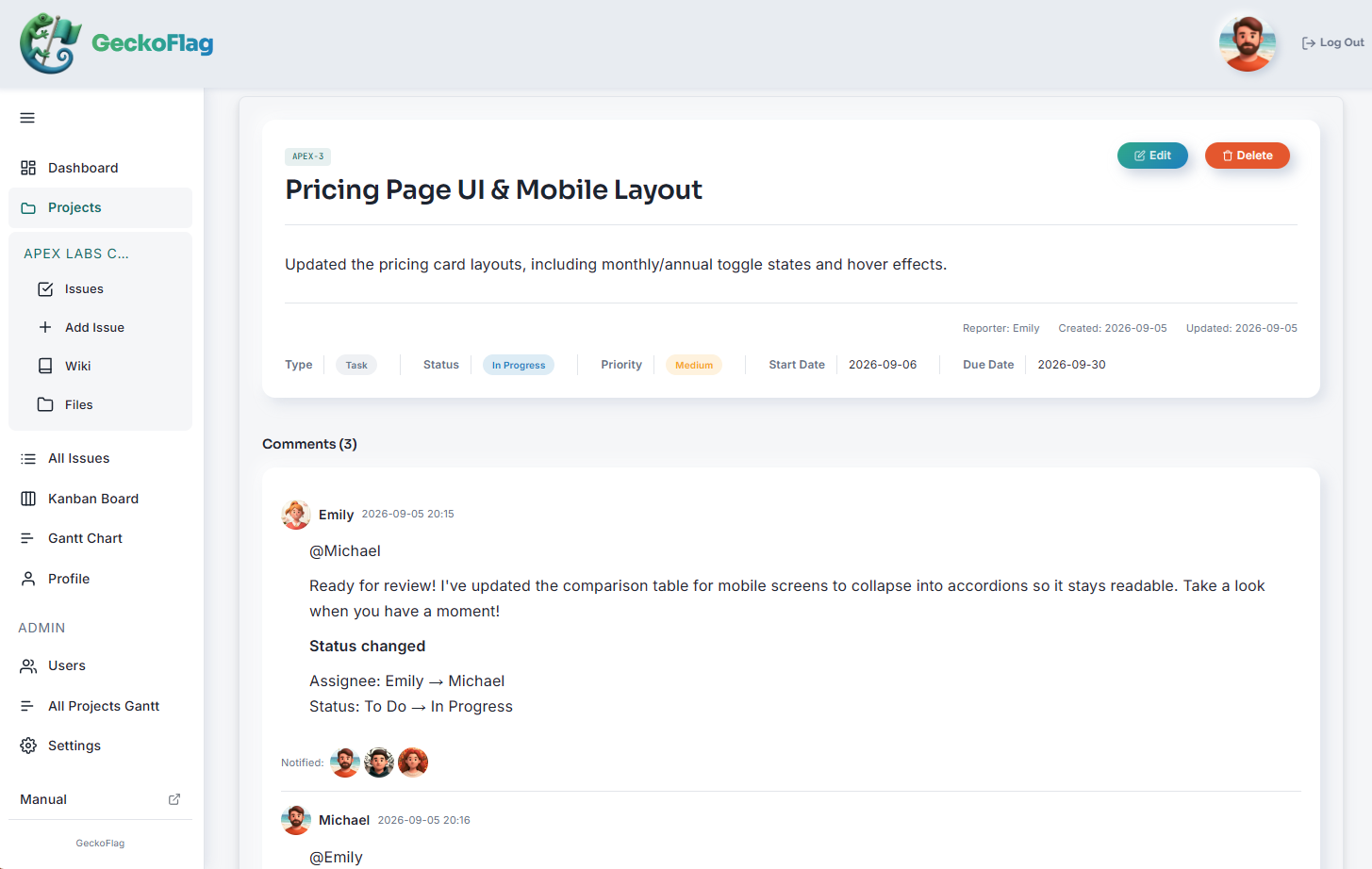
One more thing changes: how people are notified. In many tools, you can send a notification to the people involved when you add an item or write on it. There is no need to send a separate chat message saying, “I put it in the sheet, please take a look.”
Summary
Requests get lost in chat and email not because someone is slacking off, but because tools built for talking have no place to clearly write down and hold on to a request’s details, owner, deadline and whether it is done.
If you see the following signs, it is time to think about where your requests should live:
- You scroll back through chat and email looking for where you were asked
- There are many “How is that going?” messages
- You hear “That’s not what I meant” when you show finished work
- “Oh, I thought Sam was handling it” keeps happening
- You copy your to-dos onto paper or into a notes app
- You remember deadlines at the last minute and scramble
Start with better chat habits. If requests still slip away, try separating the places: discussions in chat, requests in a tool.
If you want to try one
If you are thinking “we need a place for our requests,” here is one option: GeckoFlag, the tool used for the example screen in this article.
- See the screens before you buy: there is a public demo.
- One assignee per issue: it is clear whose job it is. Your dashboard shows a list of the issues assigned to you.
- Choose who to notify: when you add an issue or post a comment, the members you select receive an email notification. The steps are in the Comments on Issues page of the manual.
- Set it up by following the on-screen guide: you put the files on your server, then fill in the steps the browser walks you through. No command-line work is needed. The steps are in the Installation page of the manual.
- A one-time purchase of $30: there is no monthly fee, and adding people costs nothing extra. You do need to pay for your server separately. See the pricing page for details.
Note that GeckoFlag does not integrate with chat apps such as Slack or with email services such as Gmail. You use it by keeping the places separate: discussions in chat, requests in GeckoFlag.
If your company website already runs on shared hosting, you may be able to install it there. You can check what is needed on the System Requirements page of the manual.
Note: if your company already has its own domain, most shared hosting lets you create a subdomain such as “geckoflag.yourcompany.com” and install it there. In that case, you do not need to buy a new domain.
Start with the demo and try adding one thing you were recently asked to do in chat.